
Hospitals, retirement homes, senior living communities, and other care organizations often face a practical challenge that seems simple at first but can become surprisingly time-consuming in daily operations: arranging personal care services for patients and residents who may not be able to travel easily to a salon or coordinate appointments on their own. A haircut before a resident moves into a new care setting, a manicure or pedicure for someone who has limited mobility, or routine mobile beauty services for residents can require staff members or family members to make phone calls, coordinate schedules, communicate room information, confirm appointments, and keep track of multiple service requests.
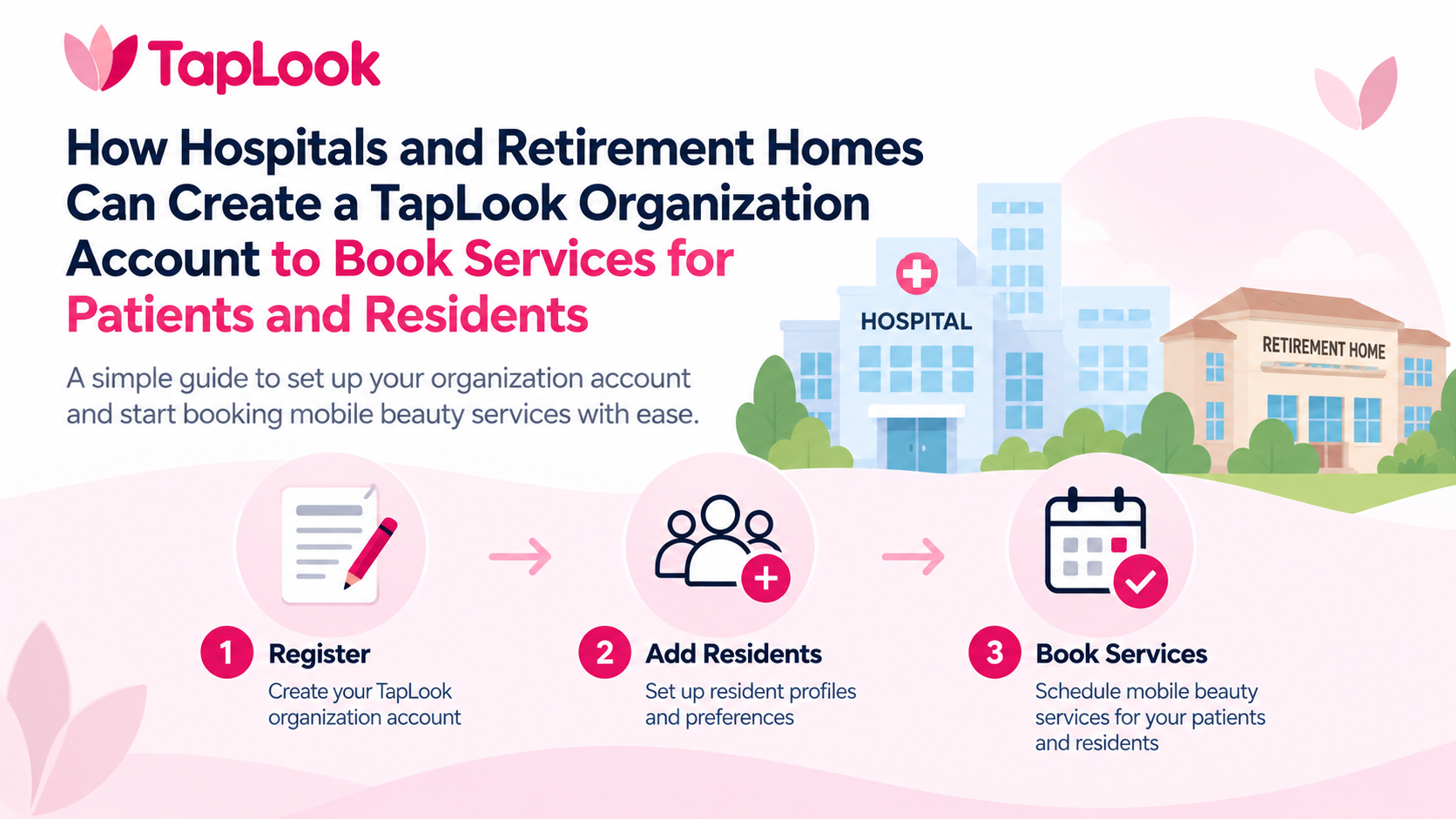
TapLook is designed to make this process more organized by bringing mobile beauty services directly to the location where the client lives, stays, or receives care. In addition to serving individual customers and families, TapLook provides an organization booking option specifically intended for staff working in hospitals, retirement homes, senior living environments, and other organizations that may need to arrange services for patients, residents, or clients.
The TapLook Organization Account provides a dedicated environment for organizations rather than treating every appointment as an isolated consumer booking. An authorized staff member can create an organization account, sign in to the TapLook Business Portal, maintain resident or client information, review bookings, organize recurring service needs, manage staff access, and keep relevant service activity in one place.
This distinction is important because an individual customer and an organization usually approach mobile services differently. An individual may need a haircut or pedicure occasionally and can simply complete a booking for themselves or a family member. A retirement home, by comparison, may have multiple residents who need services at different times. A hospital staff member may need to arrange an appointment for a patient while keeping the organization as the primary booking contact. A care organization may have several staff members who need access to the same organizational booking environment.
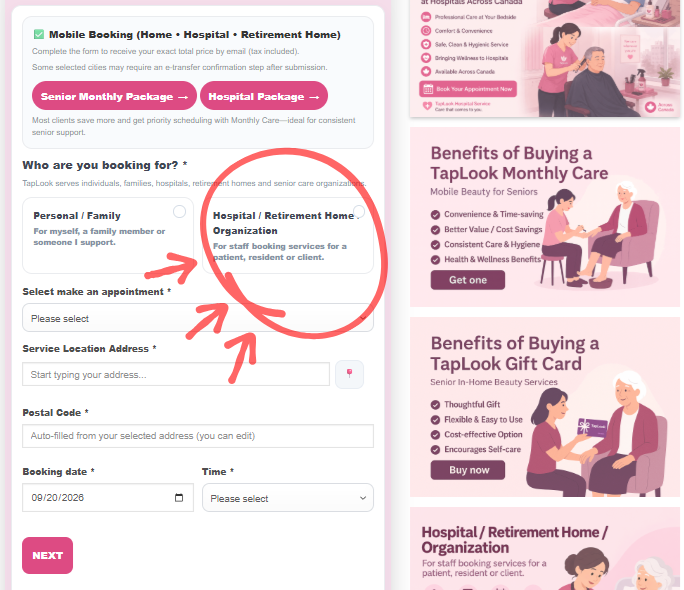
TapLook therefore separates the customer experience into two clear paths: Personal / Family and Hospital / Retirement Home / Organization. This allows someone arriving at the TapLook booking system to immediately understand that the platform is not limited to individual household appointments. Hospitals, retirement homes, senior living communities, and care organizations can also use TapLook as an organizational service platform.
An organization can begin in two ways. Staff can create a TapLook Organization Account directly through the TapLook Business registration page, or they can begin by making an organization booking through the standard TapLook booking process. When the organization pathway is used, TapLook can associate the service request with the organization environment so that future activity can be managed more efficiently.
The purpose is not to make a simple service appointment more complicated. In fact, the organization system is designed to do the opposite. A staff member who only needs to arrange one appointment can still complete a straightforward booking. Organizations that regularly coordinate services for multiple residents or patients, however, can use the Business Portal to create a more structured workflow.
3 Steps to Create an Organization Account for a Hospital or Retirement Home on the TapLook Platform
Creating a TapLook Organization Account is designed to be straightforward. The first step is to access the TapLook Business registration page and identify the organization. The registration form is intended for retirement homes, hospitals, home care agencies, senior living organizations, and other care organizations rather than individual customers.
The staff member begins by entering the organization name and selecting the organization type. This establishes the identity of the account that will appear inside the TapLook Business Portal. Additional information can then be entered, including the legal name where applicable, the approximate number of beds or clients, the primary contact name and title, email address, telephone number, billing email, physical address, city, province, postal code, website, and other relevant organization information.
The organization email is particularly important because it becomes part of the account identity and login process. TapLook checks whether the email has already been registered as an organization account. If an organization account already exists under that email, the system does not need to create another duplicate organization. The existing user can instead proceed to the Business Login area.
During registration, the organization establishes its login credentials. Once the registration has been successfully processed, the organization can use the TapLook Business Login to access its account. This gives hospitals and retirement homes a dedicated portal separate from the standard Personal / Family customer portal and separate from the TapLook Pro portal used by service professionals.
The second step is to build the organization’s working environment inside the Business Portal. After signing in, staff can begin adding residents or clients who may receive TapLook services. Rather than repeatedly entering the same resident information every time a service is needed, the organization can maintain resident profiles and use them as part of an ongoing service-management workflow.
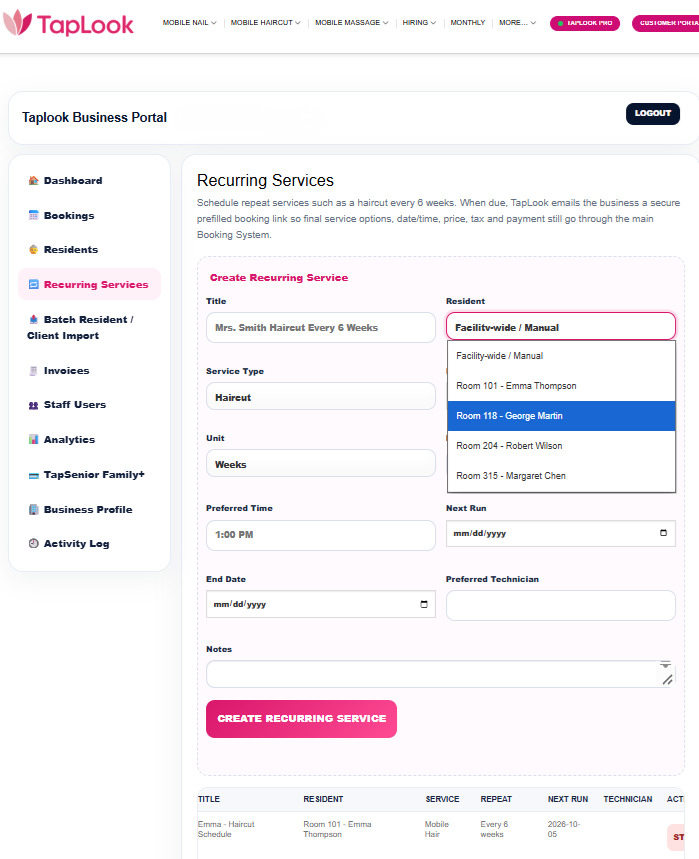
A resident profile can contain practical information that helps staff organize future appointments, including the resident’s name, room and floor information, telephone details when appropriate, preferred services, service frequency, care notes, family contact information, TapSenior information, and other service-related details available within the portal. This is particularly useful in a retirement home where one staff member may be coordinating services for several residents.
The value of this structure becomes clearer as the number of residents increases. Imagine a retirement community where one resident receives a haircut approximately every six weeks, another regularly requests a pedicure, and another periodically receives both hair and nail services. Without an organization-level system, these requests can easily become disconnected appointments managed through separate emails, notes, or staff members. With resident profiles, the organization has a clearer framework for associating service needs with the correct person.
The Business Portal also supports staff users. This matters because an organization account should not depend entirely on one employee. A retirement home may have a resident services coordinator, recreation staff, reception staff, or management personnel involved in arranging appointments. Hospitals and care organizations may similarly have more than one authorized staff member involved in coordinating non-medical personal care services.
The organization environment is therefore designed around the organization rather than around a single person’s private customer account. The organization remains the central entity, while staff and resident information can be managed within that environment.
The third step is to begin booking and managing services for patients or residents. When making a booking through TapLook, staff can identify that the appointment is being arranged by a Hospital / Retirement Home / Organization rather than by an individual or family. This distinction helps keep the booking connected to the appropriate organizational context.
The service itself is still provided to an individual person. The hospital, retirement home, or organization may be arranging the appointment, but the patient or resident remains the service recipient. This separation between the person making the booking and the person receiving the service is important in institutional settings because the staff contact and service recipient are often different people.
For example, a retirement home staff member may arrange a haircut for a resident. The staff member provides the organizational contact and appointment information, while the resident information identifies who will actually receive the haircut. In a hospital environment, a family member or staff member may coordinate a manicure, pedicure, or haircut for a patient who is staying in a particular unit or room. TapLook’s booking structure is intended to preserve that distinction rather than assuming that the person entering the booking information is always the person receiving the service.
Once appointments begin flowing through the organization account, the TapLook Business Dashboard becomes the central place for managing organizational activity. The portal includes areas for bookings, residents, recurring services, invoices, staff users, analytics, the organization profile, TapSenior-related information, and activity records. This allows the organization to move beyond individual booking confirmations and develop a more consistent process for managing mobile beauty services.
One of the most useful elements for retirement homes can be recurring service management. Personal grooming is rarely a one-time need. Hair grows, nails require continued care, and many residents prefer a regular routine. When staff are responsible for many residents, remembering who may need another service and when can become difficult.
TapLook’s organization structure is intended to help staff organize these repeating needs. A resident can have a preferred service and frequency, and recurring service information can be maintained within the Business Portal. This gives staff a better way to plan future appointments instead of relying only on memory, handwritten notes, or scattered calendar reminders.
The system is deliberately designed so that recurring service management remains connected to the core TapLook booking process. The organization can organize and initiate the next service while TapLook continues to use its central booking workflow for the actual appointment. This helps preserve consistent appointment information, service pricing, scheduling, partner assignment, notifications, and operational management.
For hospitals, the organizational value can be somewhat different. A hospital may not necessarily have residents receiving services on a long-term repeating schedule, but there can still be situations in which a patient would benefit from an on-location personal care service. A patient preparing for discharge, moving to a retirement home, remaining in hospital for an extended period, or simply wanting basic grooming may not be able to visit a traditional salon.
In these situations, TapLook allows the service to come to the patient. The booking process can capture hospital-related location details so the service professional has more useful information about where the appointment is taking place. The organization pathway also gives hospital or care staff a clearer way to identify themselves as the booking party rather than appearing to be the patient.
This approach reflects a broader principle behind TapLook’s mobile service model: the service location should adapt to the client whenever possible. Traditional salon services generally require the customer to travel to a fixed business location. For older adults, hospital patients, people with mobility limitations, and residents of senior communities, that requirement can create unnecessary barriers. A mobile model changes the direction of travel by bringing the service professional to the customer.
For retirement homes, this can also make personal grooming easier to incorporate into residents’ normal routines. A resident does not necessarily need to arrange transportation, leave the building, wait at a salon, and travel back after the appointment. The service can instead be arranged at the retirement home according to the booking details and the services available in the area.
The organization account also provides continuity when staff responsibilities change. In a facility, the employee who arranged an appointment last month may not be the same person coordinating services this month. If all booking information exists only in one employee’s inbox, continuity can be difficult. An organization-oriented system creates a more appropriate structure because the service relationship belongs to the organization and its residents or clients, rather than to one individual employee.
Invoices and booking records are another reason to separate organization activity from ordinary personal accounts. When multiple appointments are being coordinated, staff may need to review what was booked, for whom, and when. Keeping these activities visible through a dedicated Business Portal makes the service easier to manage than relying solely on individual confirmation emails.
TapLook has also designed the account experience so that the different users of the platform are clearly separated. Personal customers use the TapLook Customer Portal. Hospitals, retirement homes, and care organizations use the TapLook Business Portal. TapLook Pros use the professional partner environment. This separation helps each group see tools relevant to its role rather than placing customers, organizations, and service professionals into the same dashboard.
For an organization that has not yet created a Business Account, TapLook also supports a more natural entry point through the booking process. When the person making the appointment identifies the booking as a Hospital / Retirement Home / Organization booking, the system can check the organization email and connect the booking with the appropriate TapLook Business environment. If the organization is new, an organization account can be created so the customer can continue managing future organizational activity through TapLook Business. If an organization account already exists for that email, TapLook can associate the booking with the existing account rather than creating unnecessary duplicate accounts.
This means a staff member does not necessarily have to understand TapLook’s entire account structure before arranging the first appointment. The immediate goal may simply be to get a haircut booked for a resident or arrange nail care for a patient. TapLook can keep that first interaction simple while providing the organization with a path toward a more structured account for future services.
For organizations that know in advance that they expect to manage multiple residents or recurring appointments, registering directly for TapLook Business is the cleaner starting point. Staff can establish the organization profile first, add residents, organize account access, and then begin booking services from an organizational framework.
This flexibility is intentional. A small senior residence and a large retirement community do not necessarily need the same workflow. A hospital unit arranging an occasional appointment has different operational needs from a senior living community coordinating ongoing services for many residents. TapLook’s organization model is intended to accommodate both situations without forcing every organization into an unnecessarily complicated process.
The distinction between organizational management and the actual delivery of care is also important. TapLook’s mobile beauty services are personal services, not medical treatment. The Organization Account helps staff coordinate appointments and service information; it does not turn a haircut, manicure, or pedicure into a clinical procedure. Hospitals and retirement homes should continue following their own internal policies regarding patient or resident consent, access to the facility, infection-control requirements, visitor procedures, and any restrictions relevant to an individual’s condition or care plan.
For TapLook, the goal is to make the logistical side of mobile personal care easier. When an organization needs a service professional to reach a resident or patient, the platform provides a structured way to identify the booking party, identify the recipient, capture the service location, manage appointments, and maintain an ongoing organization account.
The result is a model that can work for a single appointment while also scaling to repeated service coordination. A retirement home can start with one resident who needs a haircut and later add other residents as demand develops. A hospital staff member can arrange an individual patient appointment without creating a complicated institutional program. A senior care organization can maintain multiple resident profiles and use recurring service tools as its needs grow.
Creating an Organization Account also helps make the relationship between TapLook and the facility clearer. Staff members are not required to present themselves as ordinary personal customers when they are booking as part of their professional role. From the beginning, they can select the Hospital / Retirement Home / Organization pathway and use an environment built around organizational booking.
For residents and patients, the experience remains centered on receiving the requested service where they are. The technology and organizational dashboard operate behind the scenes to help staff coordinate that experience more efficiently. A resident does not need to understand account permissions, dashboards, or recurring-service management. They simply need an appropriately scheduled service and a TapLook Pro who can come to the designated location.
For staff, however, those organizational tools can make a significant difference. Having resident profiles, booking history, recurring service information, staff access, invoices, analytics, and activity information in one portal creates a clearer operational picture than managing each appointment independently.
As TapLook continues expanding mobile beauty services for older adults and people who benefit from in-home or on-location service, the Organization Account provides an important bridge between individual service delivery and institutional coordination. It recognizes that many mobile appointments are not booked directly by the person receiving the service. They may be arranged by a daughter for her mother, by a caregiver for a client, by a hospital staff member for a patient, or by retirement-home staff for a resident.
TapLook’s booking system is designed to recognize these different relationships while keeping the actual service recipient at the center of the appointment.
For hospitals and retirement homes ready to begin, the process is straightforward: create the organization identity through TapLook Business, organize the residents or clients who may receive services, and use the organization environment to coordinate bookings and future service needs. Organizations that only need a first appointment can also begin through the regular TapLook booking form by selecting Hospital / Retirement Home / Organization.
The objective is simple: make mobile beauty services easier to access and easier for care organizations to coordinate. Instead of treating every hospital or retirement-home appointment as an unrelated consumer booking, TapLook provides an organizational layer that can grow with the facility’s needs while preserving a simple booking experience for each individual patient or resident.
TapLook Canada
Bài viết liên quan: